r/unrealengine • • 5h ago

A month ago I asked for your trailers. More than 100 of you sent one.

3 Upvotes

We feature indie game trailers on YouTube, for free. More than 100 devs sent theirs since October, so we built a proper upload page:

https://nightshiftarcades.com/submit

- Free, no account, and paying never changes what we pick

- Your store link at the top of the description

- A spot on our site too

- Never before your embargo

Two new trailers go up every day. Let's build this into something big together!

What are you working on?


r/unrealengine • • 5m ago

UE5 Visualization of Potential El Nino Storm Events in San Francisco Bay

Thumbnail youtube.com
• Upvotes

Link to the original video on YouTube, where additional UE5 flood simulation visualizations can be found: https://www.youtube.com/watch?v=AD-QsqK5K0o

The video depicts a potential El Niño event in San Francisco's North Bay during Winter ‘26/’27 and was created by the UCSC Center for Coastal Climate Resilience. Flooding is derived from hydrodynamic modeling results, the wave surface uses a physics-informed visual shader approximation. The scene was built using a custom UE5 pipeline for fetching and processing geospatial data and flood simulation results.

The modeling is based on a 20-year storm event and sea levels at 20 inches (~50 cm) above normal. Flood levels are based on modeling by USGS and available on Our Coast Our Future (www.ourcoastourfuture.org). In past El Niños, sea levels typically run 6-12” higher than average years. Tide gauges across San Francisco Bay are already running 14’’ above normal for the past 30 days (Oct 17- Nov 16) and are rising.


r/unrealengine • • 8h ago

Show Off I recreated a walk through Jezero Crater on Mars in Unreal Engine 5 using real NASA terrain

Thumbnail youtube.com
2 Upvotes

r/unrealengine • • 6h ago

Tutorial Round in Unreal Materials

Thumbnail youtu.be
0 Upvotes

In Unreal materials, Round outputs the nearest whole number to the input.

If the fractional part is 0.5 or more, it rounds away from zero (1.5 → 2, −1.5 → −2).
Otherwise, it rounds toward zero (1.4 → 1, −1.4 → −1).
Exact .5 cases can depend on the GPU, so use Floor(x + 0.5) when you need guaranteed rounding up.

Tutorial: https://youtu.be/ktQD9nLPASw?si=HUMwOwq63O5hxfgM


r/unrealengine • • 7h ago

Question Is it worth continuing Animation/Cinematics...

0 Upvotes

With everything that's coming in the next few versions of UE and AI having more access to tools, Is it even worth it for someone like me that is only using Unreal for learning cinematics and animating? when AI can now create animations inside unreal engine.

I ask cause I feel like i have been replaced before i even graduated. Something that might take me months to do only for AI to do it in a few hours.

Do i pack it in? Move to another software?

Any help or advice from any Animators/Movie Artists would be helpful.


r/unrealengine • • 23h ago

Welcome to the new shitty roadmap

18 Upvotes

New one: https://dev.epicgames.com/community/unreal-engine/roadmap

Old one (deprecated): https://portal.productboard.com/epicgames/1-unreal-engine-public-roadmap/tabs/129-unreal-engine-5-8

And let's see if it's finally a roadmap (before releases), and not a changelog (after releases).

PS: Is this the new Epic's standard, in general?


r/unrealengine • • 1d ago

Discussion Blueprints are not bad, you're just bad at using them

58 Upvotes

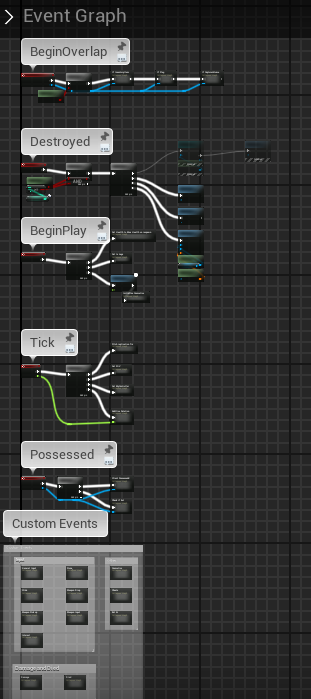
I don't understand the notion many people have with Blueprints being "bad" or "spaghetti", ever heard of collapsing graphs, reroute nodes, functions & libraries, custom events, comments, labels, etc. I swear most people who complain about Blueprints are just so terrible at using it and don't even look into ways to organise them. The anti-blueprint stereotyping really needs to stop alongside the confirmation bias people have of showing badly made blueprints as "proof" that it's bad, here's my blueprint for one of my multiplayer FPS characters for example and look how organised it is.

https://i.postimg.cc/SsTcH4db/image.png

It's almost as if knowing how to use a tool properly, eliminates most the issues you have with said tool


And for those who complain about performance, then that's why you convert the more complex Blueprint logic to C++, also UE4 performs much better than 5, so Actor System and Blueprints are not the main performance issue that people tend to scapegoat for the removal of them in favour of Verse in UE6. UE5 also has Horde which is


Visual scripting is there for a reason and fills a good role for high level logic and quick prototyping, I use C++ as well but you shouldn't have to code everything in a text based language just to do simple stuff, I had that same problem with Unity 5 before it got visual scripting and is the main reason Unreal and CryEngine appealed so much to me and many other developers.


r/unrealengine • • 17h ago

Marketplace Abandoned Hospital Prop's Pack | PSX Style

0 Upvotes

A complete set of abandoned hospital props in PSX style, ready to drag and drop into your project.

Designed for horror, survival, or any game that needs a believable abandoned medical environment.

Get it here: Abandoned Hospital Prop's Pack

This pack includes:

  1. Autopsy table
  2. Bandage
  3. Bed (with 4 variants)
  4. Matress
  5. Blood pack
  6. Cabinet
  7. Cardiac monitor (On and off variants)
  8. Clock
  9. Crutches
  10. Desk
  11. Extinguisher
  12. Filling cabinet
  13. Information board
  14. Medical cart
  15. Medicine bottle
  16. Medkit
  17. Mircroscope
  18. Sink
  19. Toilet
  20. Wheelchair
  21. X-ray Illuminator (Skull and torax variants)

r/unrealengine • • 11h ago

Cali Crazed | Fab

Thumbnail fab.com
0 Upvotes

r/unrealengine • • 19h ago

GitHub Get a phone call when your render stops/fails (Free and Open Source!)

Thumbnail github.com
1 Upvotes

Hey r/unrealengine !

You leave something rendering overnight, only to realize it crashed/finished in the first 15 mins.

So now, you can just type "When my Unreal render stops, call me" here's the demo.

Any version of Unreal, no install, no plugin, free, with local models.

It's FOSS! Try it out without install: https://app.observer-ai.com/
Join the community! https://discord.com/invite/wnBb7ZQDUC

I'm an ex-physics researcher so I constantly had to fight OOM on my simulations hahaha that's why I made this.

I'll hang out here in the comments for any feedback and suggestions.
Have a great day :DD

Roy


r/unrealengine • • 1d ago

Release Notes I have been compiling performance and optimization improvements for every UE5 release since 5.5

102 Upvotes

I have been compiling performance and optimization improvements for every UE5 release since 5.5 (and 5.9 will follow once that's leaving Preview)

Many valuable improvements and new tricks are hidden deep in the release notes, as one-liners easily missed by developers. I try to highlight these hidden gems and have compiled several lists of what you should know when upgrading engine versions.

You can find each of the performance articles below!

UE 5:8: "Hitch snapshots", a new Lumen Lite for Medium scalability spec, tons of shader permutations improvements and a lot more to explore:

https://tomlooman.com/unreal-engine-5-8-performance-highlights/

UE 5.7: Nanite (voxelized) Foliage was a huge addition, but other include VSM improvements that came in from their collaboration with CDPR.

https://tomlooman.com/unreal-engine-5-7-performance-highlights/

UE 5.6: The GPU Profiler 2.0 was a huge improvement for in-engine GPU profiling. This was actually a huge one for many of Unreal’s rendering features including Lumen, VSM, Nanite and overall Render thread parallelization.

https://tomlooman.com/unreal-engine-5-6-performance-highlights/

UE 5.5: One of my favorite additions came from Niagara which included Niagara Data Channels and Lightweight emitters.

https://tomlooman.com/unreal-engine-5-5-performance-highlights/

Many studios wait to upgrade to the latest version, these guides may help you decide whether it’s worthwhile to do so or whether you are missing out on new tricks or valuable CVARs!

I have more Performance & Optimization articles/videos on my blog: https://tomlooman.com/unreal-engine-optimization-tutorials/


r/unrealengine • • 22h ago

Marketplace All my game music packs are up to 50% off on Fab until Dec 2

Thumbnail fab.com
0 Upvotes

Hey devs,

All of my music assets on Fab are currently discounted by up to 50% as part of the Friday Mega Sale.

Whether you're building a cozy indies, a tense sci-fi/horror title, an RPG, or something fast-paced and arcade-heavy, there's a wide range of genres ready to drop straight into your project.

Storefront: https://www.fab.com/sellers/DanielCarl


r/unrealengine • • 1d ago

Help How to improve my water river setup

1 Upvotes

New to using the water plugin and trying out a simple river/ lake bed setup.
What can I do to improve this? If it's outside of velocity and depth updates please be specific in your feedback.
This is for a small area in my game and not for a large, huge landscape.
My idea is to hide the end of the river with a wall so you don't notice that the river spawns from the void.
https://youtu.be/_q0LODoV6gA
Would it be easier to just use a FAB item for this instead?


r/unrealengine • • 14h ago

Using AI to direct game trailers with UE5

Thumbnail robot-future.com
0 Upvotes

r/unrealengine • • 1d ago

Question How do i get movement to get replicated smoother when playing with actual lag?

Thumbnail streamable.com
13 Upvotes

So this is default character movement component when running with default average network emulation settings.

Target: Client
Profile: Average

Outgoing packets (Client → Server):
Min latency: 30 ms
Max latency: 60 ms
Packet loss: 1%

Incoming packets (Server → Client):
Min latency: 30 ms
Max latency: 60 ms
Packet loss: 1%

Is there any way to make character movement not snappy like that?


r/unrealengine • • 1d ago

Announcement Ultimate Rolling Ball Template for unreal engine

2 Upvotes

I’m excited to share something I’ve been working on for quite some time. Ultimate Rolling Ball Template (URBT) is officially RELEASED on Fab!
If you’re interested, check it out on Fab: https://fab.com/s/6093b7bb85df
I’d really appreciate your feedback on the project. You can play demo from fab link.
Thanks,


r/unrealengine • • 2d ago

Unreal Engine 6 to jettison key scripting feature earlier than planned in favor of AI coding

Thumbnail pcgamer.com
147 Upvotes

r/unrealengine • • 19h ago

Fab Black Friday Sale: 4 Unreal Engine Plugins Worth Checking Out

0 Upvotes

Hey everyone!

I've been exploring the Fab Black Friday Sale and looking through some Unreal Engine plugins that caught my attention. I came across a few interesting tools that could potentially save developers a considerable amount of development time, particularly those working on multiplayer games, online features, and RPG projects.

I thought I'd put together a list and share what I found. Hopefully, this helps anyone currently looking for useful tools to support their development workflow.

1. ScarCore Communication System

Publisher: Black Scar Studio

If you're developing a multiplayer game, this is one plugin worth taking a closer look at.

ScarCore brings several essential communication features together in one package, including:

  • Multiplayer text chat with server-side message validation.
  • Voice chat with push-to-talk and proximity-based communication.
  • Individual player mute controls and volume settings.
  • Quick messages for players who prefer not to type.
  • Live ping display with colour-coded indicators.
  • Dedicated server and direct-IP support.
  • Compatibility with Steam, EOS, and LAN.

It also includes a ready-made UI, while still allowing developers to create custom interfaces that better match their game's design.

The setup is Blueprint-based. You simply add a component to your PlayerController and configure the online platform you want to use.

What I find interesting about this plugin is that it combines voice, text, and other communication features into one system rather than requiring developers to manage several separate solutions.

2. Scar Achievement System

Publisher: Black Scar Studio

This one caught my attention, especially for developers planning to release their games across multiple platforms, such as Steam and the Epic Games Store.

Rather than building separate achievement systems for different platforms, this package brings several platform-related features together:

  • Steam achievements.
  • EOS achievements.
  • Local and offline achievements.
  • Persistent player statistics.
  • Leaderboards.
  • Friends and sessions.
  • Cloud saves.
  • Rich presence and platform overlays.

One feature worth highlighting is its automatic configuration system. Developers can configure their preferred platform while maintaining a consistent Blueprint workflow for platform services.

It also includes achievement triggers, debugging tools, configuration validation, and automatic achievement-unlock handling.

For smaller development teams, having these systems available in one package could reduce the amount of integration work required.

3. Lobbycraft: Steam & EOS Online

Publisher: FilipeTessaro

If you're looking for a more comprehensive multiplayer solution, Lobbycraft is another interesting option to investigate.

It offers a collection of online multiplayer features, including:

  • Steam and EOS integration.
  • Cross-platform multiplayer sessions.
  • Quick matchmaking and private lobbies.
  • Player invitations and password-protected rooms.
  • Waiting rooms with ready states.
  • Voice and text chat, including proximity voice.
  • Achievements, statistics, and leaderboards.
  • Cloud saves.

Another interesting feature is its ability to automatically select Steam or EOS depending on how the player launches the game.

What makes this package worth comparing is the number of online systems it brings together. Instead of integrating several smaller plugins individually, developers may be able to cover more of their multiplayer requirements through one solution.

As always, I'd recommend checking the supported platforms and compatibility requirements against your project's needs before deciding.

4. Ascent Combat Framework Ultimate

Publisher: Dark Tower Int

For anyone working on an action RPG, this is a much larger framework that deserves a look.

It includes a wide range of gameplay systems, such as:

  • Melee and ranged combat.
  • Character attributes and progression.
  • Inventory and equipment management.
  • Crafting and spell systems.
  • AI enemies and companions.
  • Quest and dialogue editors.
  • Targeting and mounted combat.
  • Save/load functionality.
  • Maps, navigation, and UI systems.

The framework uses C++ alongside Blueprint support, giving developers the flexibility to extend and customise its systems rather than being restricted to a fixed Blueprint-only template.

Since it's a fairly substantial package, I'd strongly recommend reviewing its documentation, sample project, and system architecture before purchasing. However, for developers building an action RPG, having several foundational gameplay systems available in one framework could potentially save a significant amount of development time.

My Personal Picks

Depending on what you're building, here's how I'd narrow them down:

  • Multiplayer communication: ScarCore Communication System.
  • Achievements and platform services: Scar Achievement System.
  • Online multiplayer and lobby functionality: Lobbycraft.
  • Action RPG development: Ascent Combat Framework Ultimate.

Of course, these plugins serve different purposes, so the best choice really depends on your project's scope, technical requirements, and development workflow.

A quick note before purchasing: I haven't independently tested every feature of all four plugins. The descriptions above are based on the features and information available for the products. I'd recommend reviewing the official documentation, supported engine versions, recent updates, sample projects, and user feedback before making a purchase.

I'm Curious About Your Experience

Has anyone here worked with any of these plugins in an actual Unreal Engine project?

I'd particularly like to hear from developers who have experience with:

  • Steam and EOS integration in packaged builds.
  • Multiplayer communication and session management.
  • Combining multiple plugins without compatibility issues.
  • Using larger gameplay frameworks in projects intended for long-term development.

Do you prefer using all-in-one frameworks, or do you generally build your own systems and integrate smaller plugins when needed?

I'd genuinely appreciate hearing about your experiences, both positive and negative. Real-world feedback from developers is often much more useful than a feature list when deciding which tools are worth investing in.

Always interesting to discover tools that can make Unreal Engine development more efficient!

Disclosure: I occasionally work with Black Scar Studio through an affiliate partnership. Two of the plugins mentioned in this post are from their collection. The other two are from independent publishers. I'm sharing these products because I found their feature sets interesting during the Fab Black Friday Sale.

r/unrealengine • • 1d ago

Question Would you recommend diving into Unreal Sequencer for someone looking to make cinematics/animate my own writing?

3 Upvotes

I don't have a programming or CS background, but I've done a number of basic Unreal tutorials, super basic blueprints, etc. Definitely not very good at much yet.

Is Sequencer something I can sorta learn in a vacuum for my purpose of animating/making cinematics of my own writing? I have a decent eye for cinematography, but I have no idea what goes into Sequencer or whether an eye for cinematography even helps while learning, so I'd love to gauge your opinions.

Also I'm not particularly trying to put anything into a game, just make cinematics to watch/for fun and to learn.

Thank you in advance!


r/unrealengine • • 2d ago

Last Week in Unreal: 5.9 Preview 2 is out, and ue6-main changes the cooked package layout

41 Upvotes

5.9 Preview 2 is officially here! It has the branch fixes from the previous two weeks but still behind on a lot of commits that arrived last week.

In the meantime, ue6-main recorded 1,595 commits and the biggest change is a new cooked package layout that breaks backwards compatibility and requires previously cooked data to be rebuilt.

Nothing moved on 5.8. However, you can cherry pick a few from the main branch: A fix for what the commit calls the "Top crash in 5.8.x" (UE-385593), involving an IsInGameThread() assertion in FSceneViewport::Destroy. The fix has 8 of 12 hunks matching 5.8.4 and needs a hand merge for the rest.

  • More UnrealPak fixes: The follow-up parentheses-path fix addresses additional IoStore packaging arguments being truncated. Most of the changes match 5.8.4, but the -CreateGlobalContainer switch needs a hand edit.
  • Build and packaging fixes: An empty UBT receipt could cause staging to copy no game code while still reporting success. There's also a Windows display-mode crash fix and an animation montage crash fix.
  • Android fixes: AFS pushes could hang midway through OBB transfers on Samsung devices, and OpenGL ES compressed texture updates could hit an assertion during virtual texture uploads.
  • One more security fix: A Zip Slip fix landed for File Sandbox. It's worth checking if you use plugins that depend on it, including Multi-User Editing.

On 5.9:

  • More UnrealPak fixes: The follow-up fix addresses additional IoStore packaging arguments getting cut off when launcher paths contain parentheses. Preview 2 only has the first part of this fix.
  • Animation changes: UAF.ControlRig.EnforceRigKind now defaults to false. A new a.AnimNode.PoseHistory.PublishAttribute setting also defaults to false, changing an attribute previously published by pose history.
  • Landscape and MetaHuman removals: Twelve Landscape editor subsystem functions that used layer names have been removed in favor of the edit layer API. Four MetaHuman toolset plugins were also removed, with their functionality moved into engine subsystems.
  • Web and security fixes: Browser save handling now falls back to memory when OPFS is unavailable. Crash report downloads no longer risk picking up logs from another browser tab, and web LaunchURL now respects project URL rules.
  • Toolchains haven't moved: The Windows, Apple, Android, iOS, Linux, and Wasm SDK files are identical between Preview 1, Preview 2, and the current branch head. Linux is still on clang 20 in 5.9.

On ue6-main:

  • Cooked package layout changed: Cooked inline bulkdata payloads and the bulkdata lookup table have moved after the export data. The commit explicitly says there's no backwards compatibility. Previously cooked data must be recooked, across Zen, IoStore, and loose cooked packages.
  • Four cook version bumps: CookIncrementalVersion changed four times this week, invalidating incremental cook data. The IoStore container header also moved to v7, although older headers can still load.
  • Linux moves to clang 23.1.5: The toolchain was briefly reverted to v26 before moving back to v27 the following day. Linux builds now use clang 23.1.5, with a new compiler flag for clang 23+. Expect some full rebuilds.
  • Slate API breaking changes: The FVector2D deprecation warnings were enabled and the compatibility shim was removed the following day. Slate APIs now expect FVector2f, so plugins and editor tools still passing FVector2D will need updates.
  • UBT and UAT changes: UBT no longer ignores source edits saved within one second of an action's output, fixing cases where it reported "Target is up to date" despite producing a stale binary. RunUAT -List -NoCompile also got faster, going from 5.3 seconds to 1.4 seconds on a warm Windows workspace.
  • unsync is gone: The programs, build steps, UGS presets, UAT commands, BuildGraph option, and corresponding Horde endpoints have all been removed.
  • Build infrastructure had a busy week: 53 commits touched UnrealBuildAccelerator paths, up from 36 last week and 18 the week before. Cache server fixes now let clients fall back to building without the cache rather than hanging indefinitely.
  • Rendering changes: Legacy ray traced shadows are now deprecated, with MegaLights identified as the replacement. Nanite ray tracing also gets a new per-platform support flag, allowing platforms to skip compiling those shaders.
  • More security changes: .upack imports now reject path traversal by default, and cooker/EditorDomain listen sockets now bind to 127.0.0.1 instead of all network interfaces.

Full Report: https://speedrun.ci/en/blog/last-week-in-unreal-nov-16-22-2026


r/unrealengine • • 2d ago

How do you keep Unreal Engine projects optimized as they grow in complexity?

18 Upvotes

I've been thinking about performance optimization in Unreal Engine, especially how things can become more challenging as a project grows and more systems, assets, and gameplay features are added.

Something that seems interesting is how a project can run smoothly during early development but start experiencing performance drops as the world becomes larger and more detailed.

For example, imagine a scene that initially runs well, but after adding more assets, lighting, effects, and AI systems, the frame rate starts dropping unexpectedly.

Where would you start investigating?

Would you first look at GPU and CPU usage, examine draw calls, check shader complexity, or use Unreal's profiling tools?

I know Unreal provides tools like Unreal Insights, Stat Commands, and GPU Visualizer, but I'm curious about how experienced developers actually approach optimization during production.

A few things I'd love to hear other developers' opinions on:

  • How early do you start profiling performance in a new project?
  • Do you optimize individual systems as you build them, or focus on optimization after the main features are complete?
  • What's one performance issue that surprised you the most in an Unreal Engine project?
  • How do you decide whether to optimize something or leave it alone?

I'm particularly interested in practical experiences and real development workflows rather than just general optimization tips.

Would love to hear how others approach this in their projects!


r/unrealengine • • 1d ago

Reinstalling a version takes less disk space...(?)

0 Upvotes

Hi all, just wondering if this could have downsides:

If you installed a version from its Preview, updating it to its latest hotfix, lets say x.x.4, it keeps eating some disk space, but if you remove it and reinstall directly the latest x.x.4, it can save up to 20GBs, in the case of 5.5.4, for example.

Why this happens? Shouldn't be managed automatically when updating? And more important, can this affect your projects?

Thank you!


r/unrealengine • • 1d ago

Unreal Engine Materials Nested Groups and Text Dropdowns!

3 Upvotes

Hey all! I work with Materials a lot in Unreal Engine and found out two pretty nifty features that I couldn't find documented anywhere on the internet yet: text dropdowns on scalar parameters and a way to create a hierarchy in parameter-groups!

I had the chance to make a blog about it, If you also work a lot in Unreal Engine Materials, definitely check it out as it can make organising your materials a lot easier: Two Hidden Material UI Improvements in Unreal Engine | Day III Digital


r/unrealengine • • 1d ago

Question Should I use different Game Mode Blueprints?

1 Upvotes

I'm working on my game currently, and as the player progresses the gameplay progresses. So the first game genre is you playing a shoot em up but you can only move left to right, the next area you are allowed to move in any direction. Would i use the same GameMode base and only change the player pawn? Or use a different game mode? Please and thank you!


r/unrealengine • • 2d ago

Question What breaks video playback in your Unreal projects? (LibVLC dev asking)

10 Upvotes

I'm a VideoLAN member and I work at Videolabs, a company built around VLC. I maintain VLC for Unity and LibVLCSharp, the .NET bindings for LibVLC, and contribute to LibVLC itself, the engine inside VLC media player.

I've started working on LibVLC in Unreal, and before I decide what to focus on I'd like to hear from people who actually ship video in Unreal.

On the Unity side, these are the problems that come up most:

- live streams: RTSP and HLS latency, dropouts, reconnecting when a camera goes offline
- files using a codec or container the built-in player doesn't handle
- hardware decoding that works on one platform and not the next
- getting decoded frames into a texture without eating the frame budget
- audio: keeping it in sync, or routing it through the engine instead of straight to the OS

Is it the same in Unreal? If Media Framework doesn't cover what you need, I'd like to hear what's missing.

Happy to answer LibVLC questions in the comments too.